
GSAP Tween과 Timeline 사용법 정리
웹 애니메이션 라이브러리 GSAP의 기본 개념인 Tween과 Timeline, 그리고 애니메이션 순서를 정하는 position parameter 사용법을 정리했다.
GSAP이란?
GreenSock Animation Platform
프론트엔드 개발자와 디자이너들이 쉽게 사용할 수 있는 아주 강력한 타임라인 기반의 애니메이션 자바스크립트 라이브러리이다.
GSAP는 CSS의 keyframe과 animation 보다 더 정밀한 컨트롤을 할 수 있으며 가볍고 사용방법이 쉽다는 가장 큰 장점이 있다.
Tween
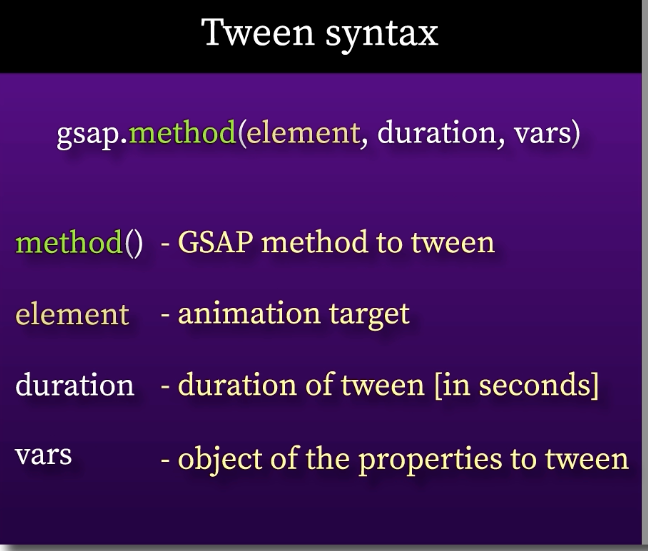
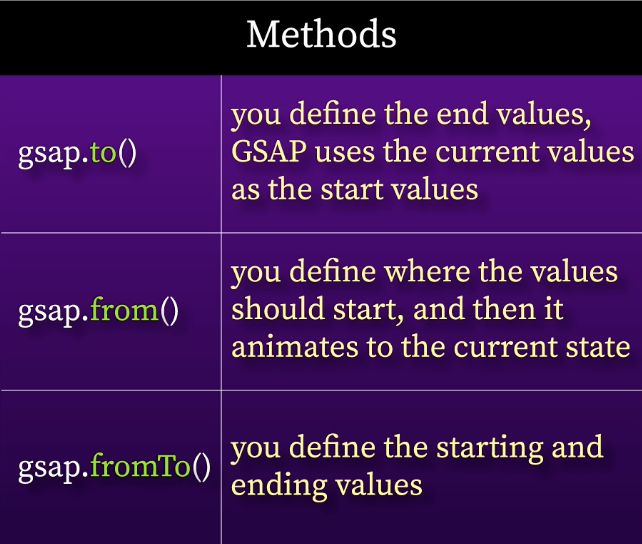
Tween은 애니메이션을 정의하는 객체 개념이라고 보면 된다.
gsap.to("#b", 3, {delay:2, x:700, repeat:-1});
gsap.from("#g", 3, {delay:2, x:700, repeat:-1});
gsap.fromTo("#r", 3, {x:200}, {delay:2, x:700, repeat:-1})
코드의 간결성을 위해 fromTo method의 사용을 피하는 것이 좋다.
Timeline
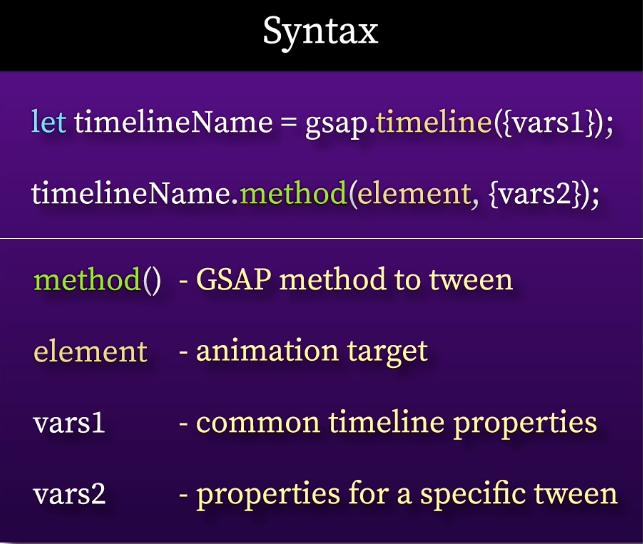
Timeline은 tween 및 기타 timeline의 컨테이너 역할을 하는 강력한 시퀀싱 도구로, 애니메이션의 타이밍을 정확하게 관리할 수 있다.
타임라인의 속성은 tween의 모든 디폴트 속성들을 override한다.
사용법은 아래 코드와 같다.
let tl = gsap.timeline({
  defaults:
    {duration: 2, ease: "power1.inOut", yoyo: true, repeat: -1}
})

  .to("#cr1", {x: 500})
  .to("#cr2", {x: 461.94, y: -191.64}, "<0.25")
  .to("#cr3", {x: 353.55, y: -353.56}, "<0.25")
  .to("#cr4", {x: 191.34, y: -461.94}, "<0.25")
  .to("#cr5", {y: -500}, "<0.25")
  .to("#cr6", {x: -191.35, y: -461.94}, "<0.25")
  .to("#cr7", {x: -353.55, y: -353.56}, "<0.25")
  .to("#cr8", {x: -461.94, y: -191.34}, "<0.25")

document.addEventListener("click", function(e) {
  tl.reverse();
});
document.addEventListener("dblclick", function(e) {
  tl.play();
});
position parameter
위의 코드에서 “<0.25” 부분에 해당하는 파라미터이다.
모든 tween method에서 사용 가능하고, 타임라인에서 애니메이션의 insertion location을 결정한다.
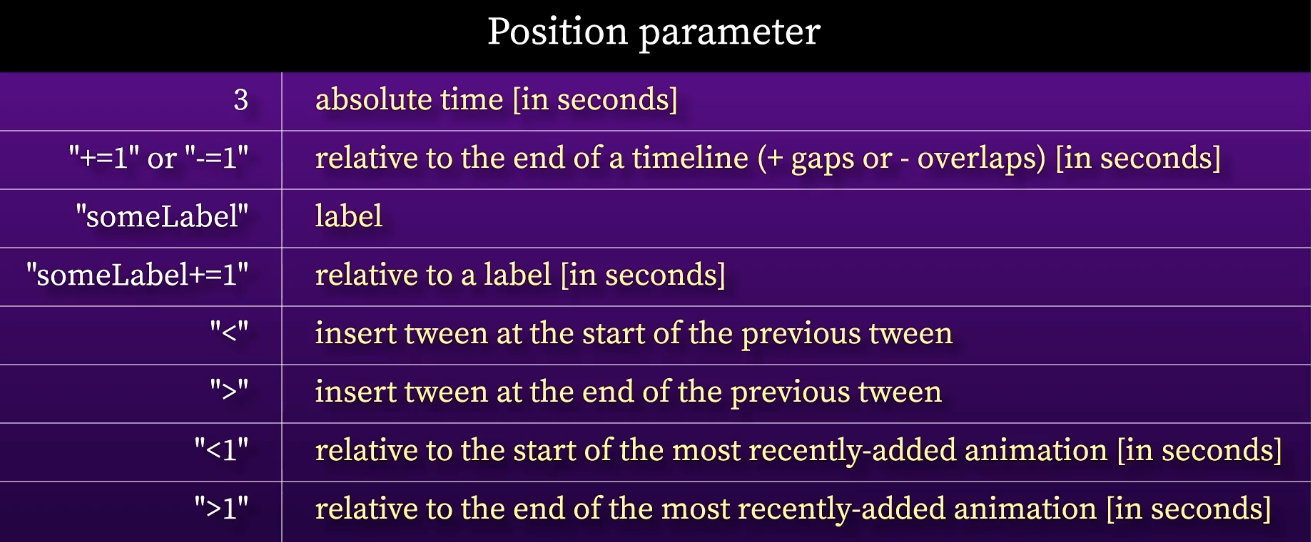
position parameter을 absolute time [seconds]로 작성했다면
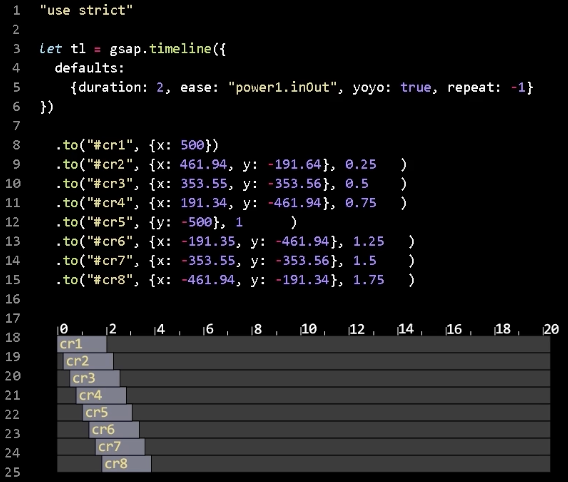
relative to the end of a timeline [+=seconds / -=seconds] 방식으로 작성한다면
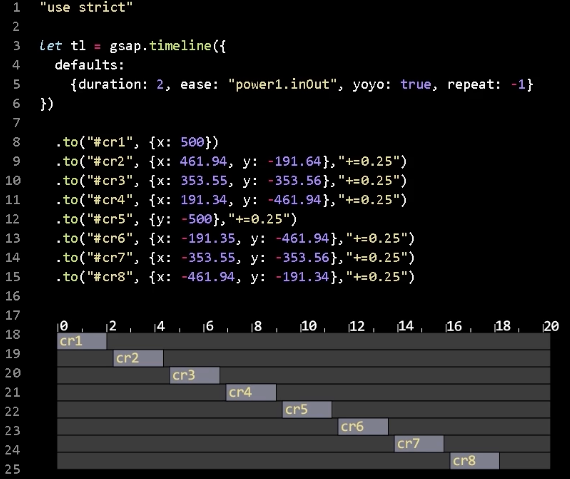
첫번째 원을 제외한 모든 원이 처음으로부터 0.25초 이후에 움직이기 시작하는 것이 아니다.
타임라인의 지속시간을 정하지 않았고, 각 tween의 지속기간을 나타내는 디폴트 파라미터를 지정한 것도 아니기 때문에,
타임라인의 duration은 점진적으로 늘어나게 된다.
앞 tween의 동작이 끝나는 시점부터 0.25초 후에 동작한다.
relative to the end of the most recently-added animation [>seconds] 의 방식도 이와 같이 동작한다.
relative to the end of the most recently-added animation [>seconds]인데 seconds 값을 음수로 한다면
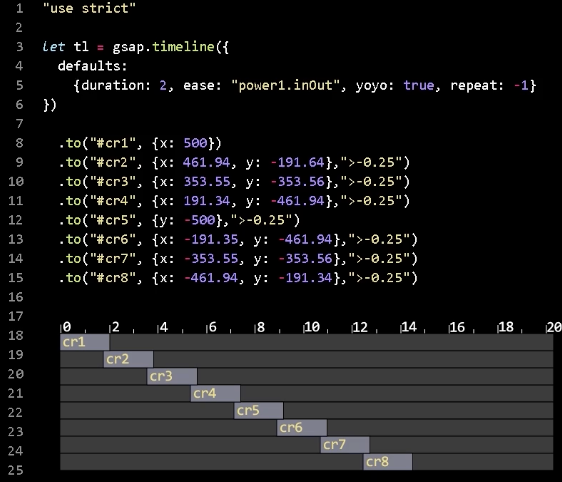
relative to the end of a timeline인 “-=0.25” 도 이와 동일하게 동작한다.
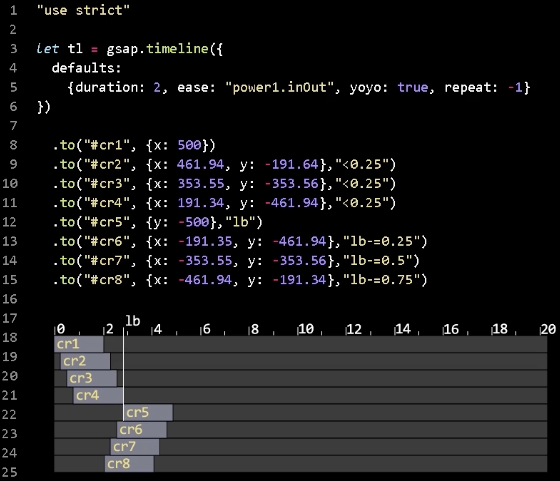
tween의 position parameter에 label 변수명을 넣으면, 해당 라벨 기준으로 -=, += 하여 시간차를 설정할 수 있다.
control method
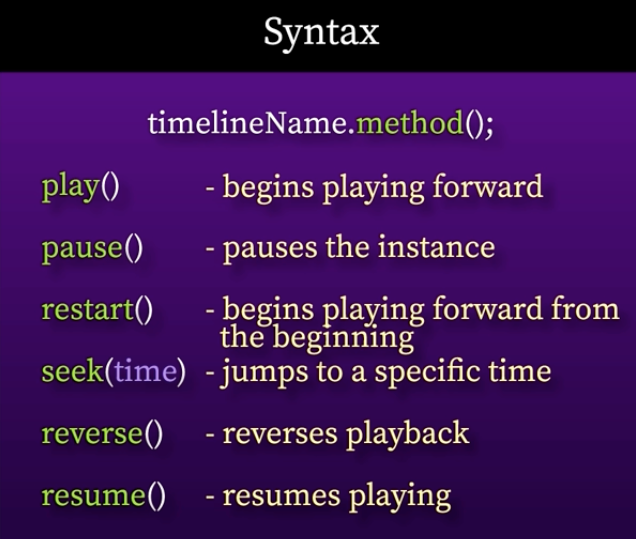
예제는 다음과 같다.
gsap.registerPlugin(MotionPathPlugin); //path를 따라 움직이게 하는 플러그인

let timeline = gsap.timeline({
  repeat: 2,
  repeatDelay: 5,
  defaults: {duration: 12, ease: "power1.inOut"}
})

  .to("#hand", {
    motionPath: {
      path:"#path",
      align:"#path",
      alignOrigin:[0.28, 0.08]}
  })

  .to("#path", {strokeDasharray: "4046, " + "0"}, "<");

document.getElementById("pause").onclick = () => timeline.pause();
document.getElementById("play").onclick = () => timeline.play();
document.getElementById("reverse").onclick = () => timeline.reverse();
document.getElementById("seek").onclick = () => timeline.seek(5);
document.getElementById("restart").onclick = () => timeline.restart();